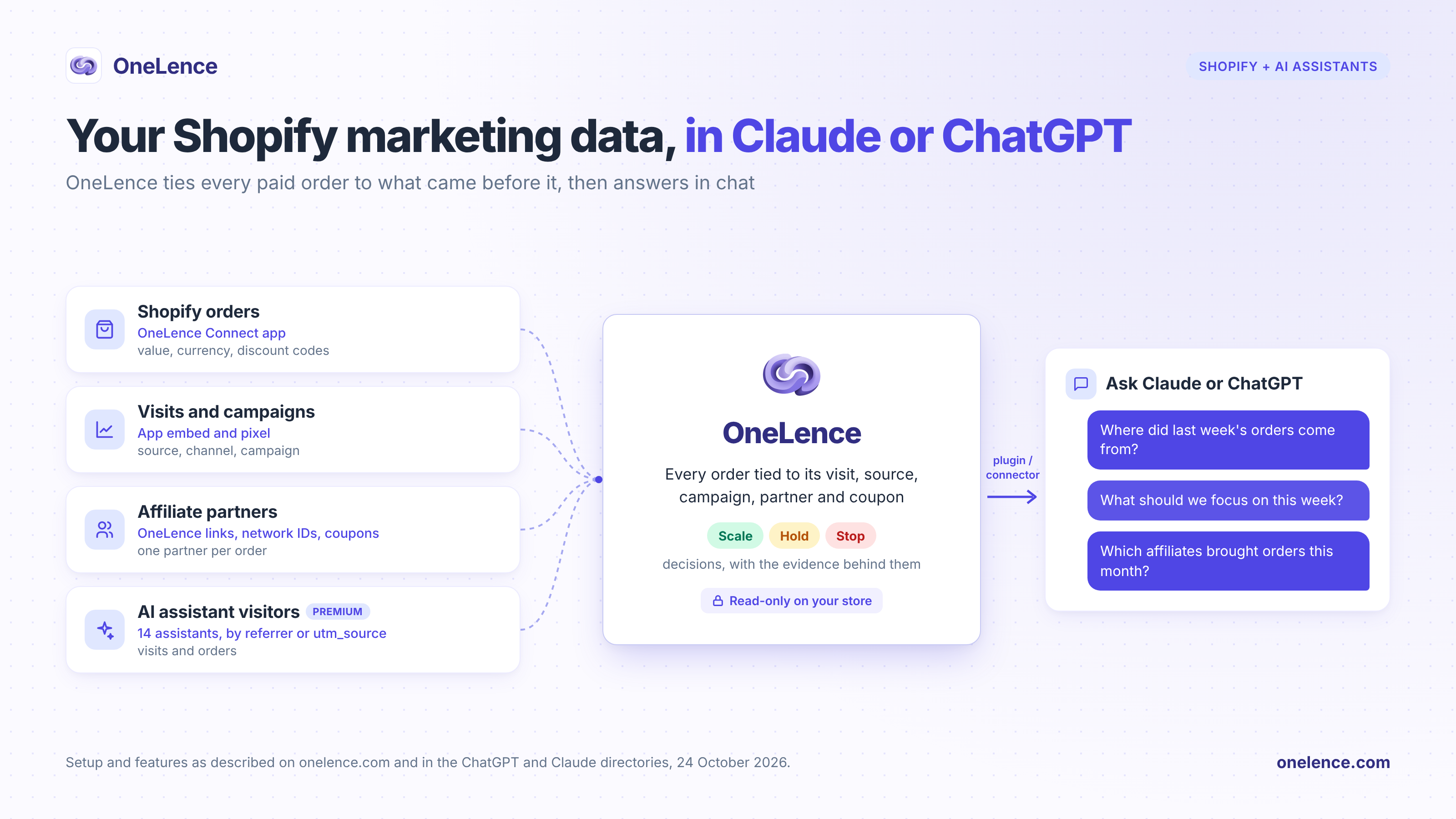
To use Claude or ChatGPT for Shopify marketing data, install the OneLence Connect app on your store, then add OneLence to your AI app: the OneLence plugin in ChatGPT, or the OneLence connector in Claude. From then on, every paid order is tied to the visit, source, campaign, affiliate partner and coupon code behind it, so you can ask "Where did last week's orders come from?" and get the answer with what to scale, hold or stop.
I'm a co-founder of OneLence, so this is a guide to our own product, and I'll stick to what it does today. OneLence helps marketing teams find growth opportunities, know what to do next, and grow more efficiently without simply spending more. Every setup step and feature below is taken from onelence.com as of 24 October 2026.
Why is the join the hard part?
Shopify's own plugin for ChatGPT and connector for Claude, launched on 4 May 2026, are great at store questions: sales, orders, customers and products, plus managing products, collections, inventory and discounts from chat (Shopify Help Center, checked 24 October 2026).
Marketing questions ask something else: which visit, campaign, partner or coupon came before each order. That answer is spread across systems that each count their own part. An ad platform counts conversions under its own attribution setting. Each affiliate network sees only its own partners, so when a buyer clicks through partners on two networks, both can claim the order. Visits from AI assistants often arrive without a referrer.
OneLence makes the join on your own site. It follows each visitor journey, ads, search, email, partners and AI assistants included, and gives every order one answer. Claude or ChatGPT then reads joined data instead of rebuilding the join in each chat.
You could wire something similar by hand, with a separate MCP server per platform and CSV exports pasted into every conversation. That's the slower route, and the join has to be redone each time.
How do you set it up?
1. Install OneLence Connect. Install OneLence Connect from the Shopify App Store, or choose Shopify when you create your OneLence workspace. Installing the app is free, and you need a OneLence plan or the 7-day free trial.
2. Turn on the app embed. In Shopify admin, open Online Store, then Themes, choose Edit theme, open App embeds, turn on OneLence Connect and save. Visit your store once so the first visit arrives. From here, OneLence reads paid orders with their value, currency and discount codes, plus storefront activity: page views, product views, add to cart and, if you turn them on, checkout starts.
3. Add your affiliate partners. OneLence recognizes a partner in three ways: a OneLence link (any page of your site with ?olaff= and the partner's code), the publisher ID the partner has on networks such as Awin, Impact, CJ or Rakuten, or an exclusive coupon code. Each order goes to the partner whose link was the last click before it, and an exclusive code credits its partner when no partner link won the order. Mark shared or public codes as shared, so they stay as evidence only. The full rules are on our affiliate tracking page.
If you pay partners on Awin, UpPromote or Impact, upload each network's CSV export under Affiliates, then Reconcile commissions, in the OneLence app. OneLence checks every claim against the last 60 days of Shopify orders and flags orders claimed on several networks, commissions on cancelled or refunded orders, sale amounts that don't match the order, and claims with no matching order.
4. Add OneLence to ChatGPT or Claude. OneLence is listed in both apps' directories, so there's no server address to type.
- ChatGPT and Codex: open Plugins in the ChatGPT sidebar, find OneLence, select Install plugin and sign in to OneLence when asked, then pick the workspace. In a chat, type @OneLence or let ChatGPT use it when your question needs it. The same plugin works in Codex. The plugin directory is open on every ChatGPT plan, and in Business, Enterprise and Edu workspaces an admin decides which plugins members can install (OpenAI Help Center, checked 24 October 2026).
- Claude: open Customize, then Connectors, select the + button, find OneLence in the directory and choose Connect. Sign in to OneLence, pick the workspace Claude may use and approve. Directory connectors work for all Claude users on the web, desktop and mobile apps, and on Team and Enterprise an Owner adds OneLence for the organization first, after which each member connects (Claude Help Center, checked 24 October 2026).
Using Cursor, Claude Code or another MCP client? Add the remote server https://mcp.onelence.com and sign in. The OneLence MCP server page has the setup for each client, plus permissions and every tool.
5. Check tracking, then ask. Start with "Is tracking working on the store?" You get the visits, events and orders from the last few minutes, with what to check if nothing arrived.
Which questions can you ask once it's connected?
| Ask Claude or ChatGPT | What you get back |
|---|---|
| "Where did last week's orders come from?" | Visitors, orders and conversion rate by source, channel and campaign |
| "What should we focus on this week?" | What deserves attention, and which sources and partners to scale, hold or stop, with the evidence and what is still missing |
| "Which affiliates and coupon codes brought orders this month?" | Partners with their referral and coupon codes, clicks, orders and conversion rate |
| "Show me the last 20 orders and how each was attributed." | Each order with its time, value and currency, the attribution method, and the affiliate and coupon behind it |
| "Did visitors from ChatGPT or Perplexity buy anything?" | Visitors from AI assistants and the orders they placed (Premium) |
| "We doubled the Meta budget yesterday. Log it." | A summary to confirm. Once you agree, OneLence records the change, so you can ask later what followed |
In Claude and ChatGPT, four answers appear as interactive cards: the briefing, the list of recommendations, the recommendation for one source, and the performance overview.
The plan decides how wide the review goes. Starter reviews affiliate and partner sources, and Pro and higher plans add paid, organic, creator and referral sources to the same review. Visitors from AI assistants, bot traffic and SEO opportunities need Premium or Scale.
What can the assistant change?
Very little, by design:
- Your store stays as it is. OneLence's access to Shopify is read-only. Products, prices, discounts, orders and customers stay as they are.
- Your ad accounts stay yours. OneLence never touches your ad accounts and never moves money. When you change a budget yourself, it can record that change.
- Changes inside OneLence wait for you. The 8 tools that change something inside OneLence, such as logging a change or updating your business context, first return a summary, and nothing is saved until you confirm.
- You can disconnect at any time under Settings, then Developer, in OneLence, and access ends immediately.
How do you check an answer?
- Ask which tool the number came from and for which dates.
- When a number surprises you, ask for the orders behind it ("Show me the last 20 orders and how each was attributed") and open a few in Shopify.
- Expect OneLence's totals to differ from Shopify's. OneLence's source reports count the paid online orders it can tie to a visit on your store, from the day you connect the app. Shopify's totals also include point-of-sale and draft orders.
- Mark 8 to 15 October 2026 when you read AI traffic. ChatGPT stopped adding utm_source=chatgpt.com to its links around 2pm PT on 8 October, and the fix rolled out from 15 October (attribution.now changelog, checked 24 October 2026). Treat that week as one event, not a trend.
FAQ
Does OneLence change my Shopify store or my ads?
It reads your store and leaves it as it is. OneLence asks Shopify for read access to orders, customers and customer events, plus permission to add its pixel. Ad budgets and campaigns stay in your ad platforms, where you make the changes yourself, and OneLence can record a change once you've made it.
Which plans do I need?
On the OneLence side, any plan with an active subscription, or the 7-day free trial. Asking about orders, sources and affiliates works on every plan, and visitors from AI assistants need Premium or Scale (pricing). On the AI side, the OneLence plugin is in ChatGPT's plugin directory and the OneLence connector is in Claude's connectors directory. In company workspaces on either app, an admin or Owner may need to allow it first, as above.
Does it work in both Claude and ChatGPT?
Yes. Install the OneLence plugin in ChatGPT, which also works in Codex, or connect the OneLence connector in Claude. Both read the same OneLence workspace. Cursor, Claude Code and other MCP clients can connect to https://mcp.onelence.com.
Where do visitors from AI assistants show up?
In OneLence's AI visibility report, on Premium and Scale. It recognizes visitors from 14 assistants, including ChatGPT, Perplexity, Claude, Gemini and Copilot, by referrer or utm_source, and counts their signups and purchases on the same site within 28 days of an AI visit. In chat, ask "Did visitors from ChatGPT or Perplexity buy anything?"
Will OneLence's order totals match Shopify's?
Not exactly, and they aren't meant to. OneLence counts the paid online orders it can tie to a visit from the day you connect the app. Shopify also counts point-of-sale and draft orders.
Next step
The Shopify integration page has the setup, the full list of questions and the 7-day free trial.
Get a free campaign check
We’ll review your campaign, surface misalignments, and share practical opportunities to improve performance.