
This section explains how to set up affiliate publisher codes, generate tracking links, and monitor partner performance inside OneLence.
Affiliate tracking is useful when you collaborate with creators, media partners, communities, or external networks that send traffic to your website.
Creating A New Affiliate Code
To start tracking affiliate-driven traffic, you first need to create a unique publisher code.
- Navigate to Settings → Affiliates.
- Click New Affiliate/Create Affiliate to open the creation window.

- Enter a Code that uniquely identifies the partner.
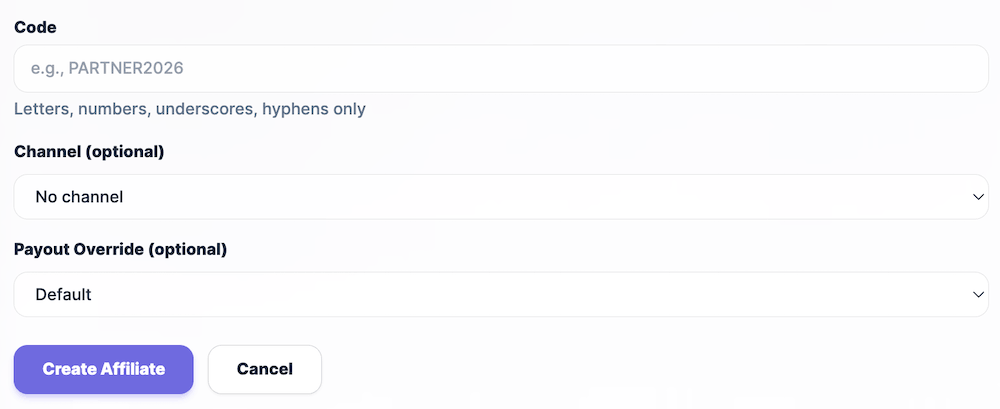
- Use letters, numbers, underscores, or hyphens only.
- A clear naming structure (for example
creator_juliaorblog_growthlab) helps long-term reporting clarity.
- Optionally assign a Channel if you want to group affiliates into broader acquisition categories.
- Choose a Payout Override if needed:
- Default → Uses the standard payout logic defined in your workspace.
- Flat → Assigns a fixed payout value per conversion.
- Percent → Applies a percentage-based payout model.
- Click Create Affiliate to generate the publisher code.
Once created, the affiliate appears in your affiliate list and can be activated for tracking.
Activating And Using Affiliate Links
After creating the publisher code, you can configure the tracking link for real campaign use.
- Open the affiliate card from the list.

- Locate the Affiliate Link field.

- Enter or confirm the destination landing page URL.
- Click Copy Link to generate the final tracking URL.

- Share this link with the partner or embed it in campaign placements.
Traffic entering through this link will automatically be attributed to the selected affiliate and included in signal interpretation, source evaluation, and decision layers.
Understanding Affiliate Performance Metrics
Once traffic begins flowing through affiliate links, the affiliate detail view provides performance indicators such as:
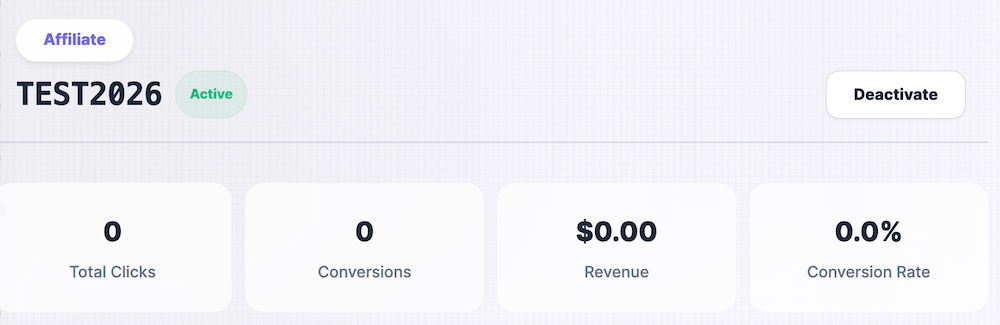
- Total Clicks: Overall referral volume generated by the partner
- Conversions: Number of successful tracked outcomes
- Revenue: Monetary impact associated with affiliate traffic
- Conversion Rate: Efficiency of traffic turning into meaningful actions
These metrics help you understand not only how much traffic an affiliate generates, but also the quality and behavioural strength of that traffic.
Managing Affiliate Status
Affiliate publisher codes can be activated or deactivated at any time.
- Deactivating an affiliate stops new attribution from future traffic.
- Historical performance data remains available for analysis.
- Reactivating the code allows tracking to resume without losing past context.
Use activation control when testing new partners, pausing collaborations, or restructuring acquisition strategies.
When To Use Affiliate Tracking
Affiliate tracking is particularly effective when:
- You collaborate with creators or influencers who promote specific landing pages
- External blogs, media outlets, or community platforms drive referral traffic
- You want clearer attribution between network-driven growth signals and other acquisition channels
- You test performance-based partnership models
When implemented correctly, affiliate tracking strengthens source-level signal clarity and improves downstream decision confidence in the Sources and Decisions layers.